MMToolParts BlogMMToolParts BlogMMToolParts BlogMMToolParts Blog
  • Tool Parts
    • Bosch Parts
    • DeWALT Parts
    • Festool Parts
    • Fein Parts
    • Hitachi Parts
    • Ingersoll Rand Parts
    • Jet Parts
    • Makita Parts
    • Milwaukee Parts
    • Porter Cable Parts
    • Powermatic Parts
    • Rockwell Parts
    • Rotozip Parts
    • Senco Parts
    • Skil Parts
    • Sioux Parts
    • Safety Speed Parts
  • Tools
    • Festool
    • DeWalt Tools
    • Makita Tools
    • Milwaukee Tools
    • Kreg
    • Porter-Cable
    • Cordless Power Tools
    • Corded Power Tools
    • Reconditioned Power Tools
    • Outdoor Power Equipment
    • Hand Tools
    • Pneumatic Tools
    • Gas Powered Tools
    • Metal Working
    • Generators
    • Polishers
    • Vacuums
    • Festool Reconditioned Tools
    • Combo Kits
  • Machinery
    • Metalworking Machines
    • Woodworking Machines
    • Work Holding
    • Planers
    • JET Tools
    • Powermatic
    • SawStop
    • Steel City
    • Laguna
  • Safesaw
  • Laguna

The “How To” of June 2011

    Home Pneumatic Tools The “How To” of June 2011
    Porter Cable Parts

    The “How To” of June 2011

    By admin | Pneumatic Tools | 0 comment | 21 August, 2025 | 0

    How to Replace the Brushes in a Porter-Cable Pancake Compressor

    A good air compressor is a key factor in ensuring the progress and quality of our work. This means that our responsibility to that compressor and its health is equally important. Maintenance, in fact, is our most useful tool in achieving longevity in our equipment and what we produce with it.

    Fortunately, the responsibility of air compressor maintenance and repair is not nearly as daunting as it may sound. In fact, it’s relatively simple when you arm yourself with just a few facts and a few simple steps. Take replacing your compressor’s brushes for example, this procedure is both simple and totally imperative to the vitality of your compressor. And yet, with the following few steps, you can replace the brushes in your compressor with perfect, professional ease.
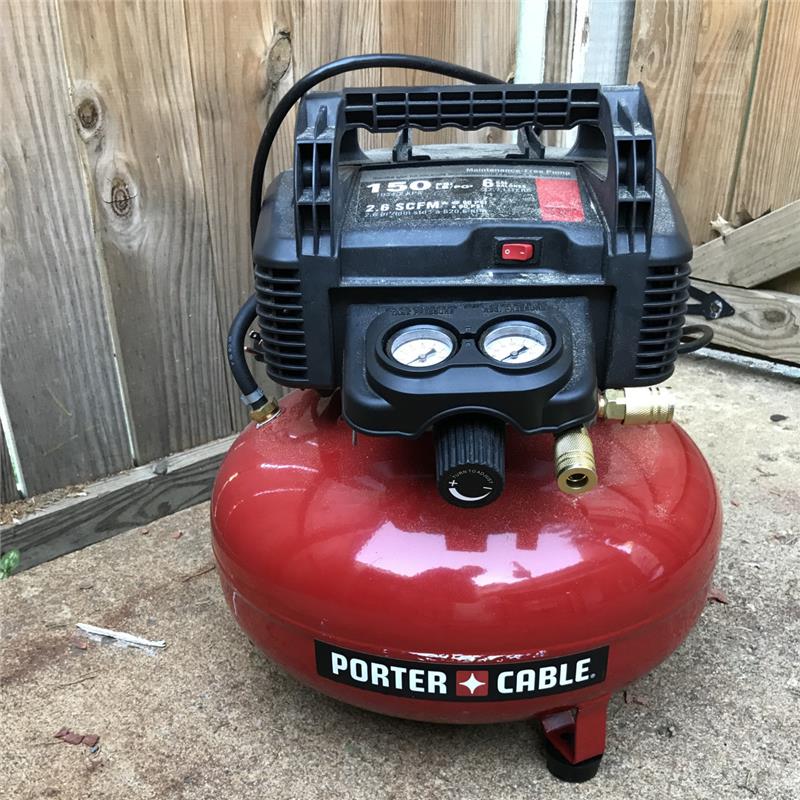
    Z-D27196
    Before beginning this repair procedure, though, it is extremely important to disengage and unplug your air compressor. You must aslo ensure the tank is entirely bled of air pressure. This keeps you, as well as your compressor, more protected from injury or damage during repair.
    It is also important to note that you must always replace your brushes in pairs. Regardless the good-looks of one brush, if one is worn or broken, you must always replace both brushes as a set. Oh, and please don’t underestimate the value of your owner’s manual. Read it, make it your friend, and bask in your new-found knowledge.
    Okay. Now, to begin, you must first remove the compressor shroud, or the casing that contains the tool’s motor. To do this, simply unscrew the screws holding the thing together (these are usually set fairly deep into the shroud) and pull the shroud apart separating it at its split down the middle. Set the shroud and screws aside safely.
    Next simply locate the brushes, there will be one brush on each side of the armature. Disconnect the brush lead terminal, or, the wire connector attached to each brush, of the brush you’re presently replacing. Very carefully move the spring away from the brush ensuring you don’t damage its springiness, get a hold of the first brush’s lead, and remove it from its holder.
    Carefully slide the new brush into the brush-holder in the same orientation the former was removed. Making certain the spring rests against the brush, replace the spring as delicately as you moved it aside. Next, reconnect that brass terminal ensuring it attaches in the same manner as prior to its disconnection.
    Next, simply repeat the above steps with the second brush, carefully and securely replace the shroud, and you and your compressor should be all set. Before you go rolling to the next job or project, though, reengage to compressor and give the thing a minor test-run to ensure your brushes are making complete and proper connections. If the compressor doesn’t run smoothly, remove the shroud once more and retrace your steps to make certain each brush is making a proper connection. If you can’t isolate the problem, it is best to quickly take your compressor to an authorized service center for a more thorough inspection.
    If everything does run smoothly, then, many congratulations, you have successfully replaced the brushes in your Porter-Cable pancake compressor.
    Posted in “How to” of the Month, Pneumatic Tools, Tool Info, Tool Tips by Mallory Kramer.
    Leave a Comment

    Cancel reply

    Your email address will not be published. Required fields are marked *

      ADD YOURS COMMENTS

      Username*

      Website*

      Email*

      Comments


      RECENT POST

      • Jig Saw Parts
        22 August, 2025
        0

        Introducing the Kreg K5 Jig, Kreg’s Best Jig Yet

      • Dewalt Parts
        22 August, 2025
        0

        Tool Sale – A Peek at our Best Deals of the Year

      • Dewalt Parts
        22 August, 2025
        0

        M&M Tool Announces Plans for Annual Power Tool and Machinery Show

      • Woodworking machine
        22 August, 2025
        1

        With Green Motives, Craftsmen Appeal the Woodworking Community to Repair Power Tools Before Replacing Them

      Categories

      Tags

      "How to" of the Month accessories batteries Compressor Dewalt Parts Drills Drivers Featured Tool of the Month festool Friends of M&M General Interest Grinders How To Articles Industrial Tips jet M&M News Machinery Makita Tool Repair miter Miter Saws Multi-Tools Pneumatic Tools Power Tool Articles Product Reviews Professional Accessories Quick Tip of the Month Repair & Maintenance Articles Routers Sanders Screws Special Interest Tool Info Tools Tool Tips Uncategorized Web Site News! Woodworking Articles

      Archives

      • August 2025

      FOLLOW US

      Blog – M&M Tool Parts

      The ultimate woodworking and power tooling resource.

      Blog Managed By mmtoolparts.com

      Categories

      Manufacturers
      Tool Parts
      Machinery
      Tools
      Accessories
      New Products

      Customer Service

      My Account
      Order Status
      Shipping & Returns
      Contact Us
      FAQ

      Resources

      About Us
      Recent Post
      Categories
      Archive
      Privacy Policy
      Site Map
      Terms and Conditions

      Connect With Us

      Customer Service Help Line
      Mon – Fri: 8am – 5pm MST
      1-866-485-8200
      In Salt Lake City?
      801-485-8200

      Parts For To

      Bosch Parts
      DeWALT Parts
      Festool Parts
      Jet Parts
      Makita Parts
      Milwaukee Parts
      Porter-Cable
      Powermatic Parts
      Rockwell Parts
      Rotozip Parts
      Skil Parts

      © Copyright 2025 MMToolParts.com | All Rights Reserved
      • Tool Parts
        • Bosch Parts
        • DeWALT Parts
        • Festool Parts
        • Fein Parts
        • Hitachi Parts
        • Ingersoll Rand Parts
        • Jet Parts
        • Makita Parts
        • Milwaukee Parts
        • Porter Cable Parts
        • Powermatic Parts
        • Rockwell Parts
        • Rotozip Parts
        • Senco Parts
        • Skil Parts
        • Sioux Parts
        • Safety Speed Parts
      • Tools
        • Festool
        • DeWalt Tools
        • Makita Tools
        • Milwaukee Tools
        • Kreg
        • Porter-Cable
        • Cordless Power Tools
        • Corded Power Tools
        • Reconditioned Power Tools
        • Outdoor Power Equipment
        • Hand Tools
        • Pneumatic Tools
        • Gas Powered Tools
        • Metal Working
        • Generators
        • Polishers
        • Vacuums
        • Festool Reconditioned Tools
        • Combo Kits
      • Machinery
        • Metalworking Machines
        • Woodworking Machines
        • Work Holding
        • Planers
        • JET Tools
        • Powermatic
        • SawStop
        • Steel City
        • Laguna
      • Safesaw
      • Laguna
      MMToolParts Blog